A hole model can be made more flexible with the use of formulas especially in the list of operations. To be able to create these formulas based on the holes' characteristics, whatever the hole shape, number of stages, and options defined, automatic referencing is required.
孔特征参考
GO2cam 中的参考是自动的,并遵循以下规则:
-
a 字母 定义参数或特征(以 蓝色 below)
-
a 数字 相对于阶段(以 红色 below)
下面提供了一个带有 3 个阶段的通孔的插图,以显示参考:
|
H : height of the stage 在操作列表中,高度 ( H ) 被加工深度 ( P ). D : diameter of the stage Dc : diameter of the stage chamfer Ac : aperture angle of the stage chamfer R : radius in the bottom of the stage 对于攻丝阶段: D : tapping diameter Dd : drilling diameter Hi : tapping height Tp : tapping pitch Do : diameter of the inverse chamfer of the stage Ao : aperture angle of the inverse chamfer of the stage 还有另外 2 个仅适用于操作列表的参数: L0 : total length of the hole z0 : value added at the end of path to make the path longer and avoid a crater in machined surface. |
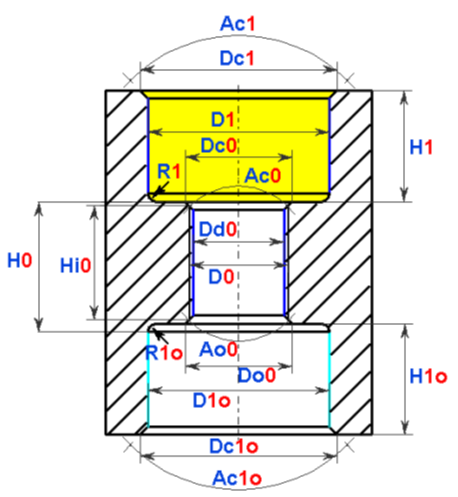
The stages are numbered 1 , 0 , 1o
|
孔参数的定义
|
在创建用户孔的过程中,每个参数都可以根据使用其他参数的数学公式进行计算。 要遵守的语法:
|
|||||||
|
数学运算符 |
|||||||
|
sqr |
平方 |
max |
最大值 |
acos |
反余弦 |
rnd |
随机 |
|
sqt |
平方根 |
min |
最小值 |
asin |
反正弦 |
log |
十进制对数 |
|
sin |
正弦 |
mod |
模数 |
atan |
反正切 |
sgn |
符号 |
|
cos |
余弦 |
exp |
指数 |
^ |
Power |
round |
舍入 |
|
tan |
正切 |
Ln |
纳皮尔对数 |
abs |
绝对值 |
trunc |
截断 |
|
|
|
|
|
int |
整数值 |
|
|
|
二元运算符: |
比较运算符: |
优先级运算符: |
逻辑运算符: |
||||
|
+ |
加法 |
> |
大于 |
( 和 ) |
或 |
逻辑或 |
|
|
- |
减法 |
>= |
大于或等于 |
特殊值: |
AND |
逻辑与 |
|
|
/ |
除法 |
< |
小于 |
Pi |
XOR |
异或 |
|
|
* |
乘法 |
<= |
小于或等于 |
|
NOT |
逻辑否 |
|
|
= |
赋值 |
<> |
不同于 |
|
|
|
|
|
== |
平等 |
|
|
|
|
||
|
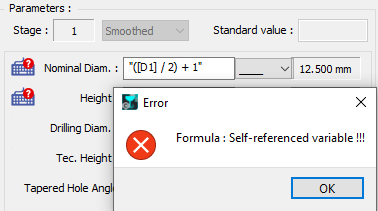
错误: 如果参数在其计算公式中使用自己的引用,则会显示“自引用变量”错误。 同样,如果为参数定义的值太小,则会显示错误。例如,倒角直径定义为小于标称直径: Dc1 = " [D1] – 1.5 " |
|
||||||
操作列表中的公式和约束
操作的参数:
参数分为 3 类:
-
孔定义 :根据约束与否执行循环,孔的单位和质量,加工深度的定义。一个有趣的参数是 重量 ,它允许修改操作的位置。默认情况下,所有循环的权重都设置为“ 0 ”,给操作的权重为“ 1 ”意味着将其定位在最后的位置(1 比 0 重)。要将循环定位在第一个位置,请将权重定义为值“ -1 ’.
-
刀具搜索 :您可以为直径定义一个最大值。
-
策略: 访问循环的几个策略参数,例如停留时间和 Z 偏移。增量深度很有趣,您可以根据公式进行计算,例如在钻孔去毛刺中,您可以将增量定义为孔长的十分之一。请阅读上面专门介绍公式创建的章节。
带有条件的公式
与在阶段页面中定义的公式相反,这些公式不仅是计算公式。 计算公式 是可能的,但这里的巨大优势是能够创建 约束 然后定义 相互依赖 在几个参数之间。
孔的每个尺寸参数都用一个参考定义,完整的列表已给出。那里描述的参数是相同的,除了我们将阶段高度 ( H ) 替换为加工深度 ( P )
2 个参数被添加到此列表中:
-
L0 :孔的总长度。在将模型应用于零件时给出此值。
-
z0 :加工结束时的超长值。您在孔选项中定义此值。
|
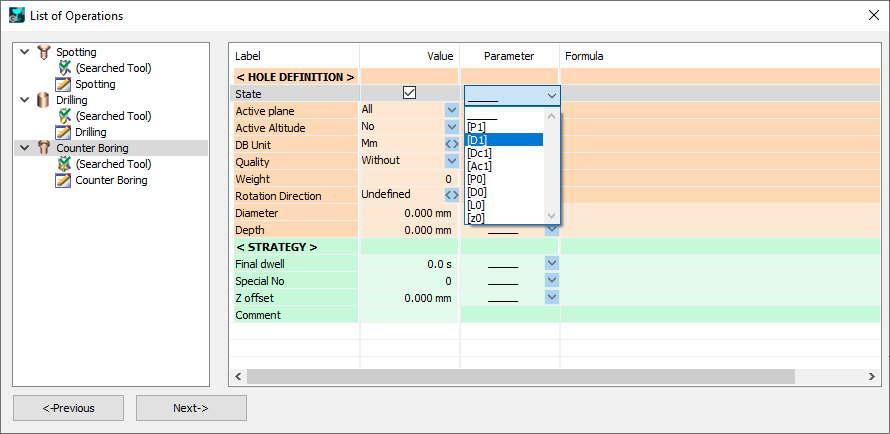
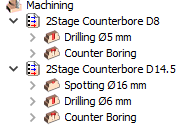
感谢参数“ 状态 ”,我们将能够 约束循环的实现 通过一个公式。 这是一个例子:一个带有 2 个阶段的沉头孔。我们只想在钻孔直径大于 10 毫米时才进行点钻操作。 为此,我们首先需要在“ 状态 ”/列“ 值 ”中激活复选框。然后在参数列表中选择钻孔直径,即 D1。 |
|
|
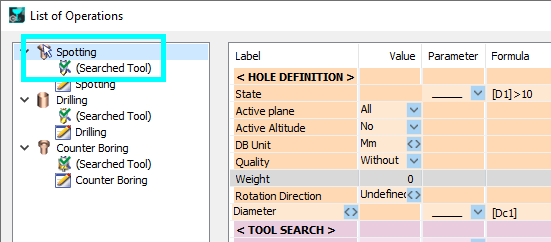
在公式字段中,输入 [D1]>10。 在操作列表中,您会注意到 白色小指针箭头 位于点钻图标上,以表明此 循环受公式约束 . |
|
|
|
应用此模型时,只需填写所需的值,操作列表就会创建,考虑到约束。 这里,2 个具有不同值的孔:
|
练习
这是一个练习,用于练习在操作列表中使用参数公式。我们将为标准六角头螺钉创建孔模型 M3、M4、M5、M6、M8、M10、M12、M16、M20 等等。
该孔是一个通孔,沉头孔,倒角和攻丝。
将有 2 个操作列表,一个带有条件:
A. 对于直径小于 18 的沉头孔
B. 对于直径大于 18 的沉头孔。
|
操作列表 |
|
|
A. 直径 <= 18 |
B. 直径 > 18 |
|
倒角点钻 |
点钻 |
|
钻孔 |
|
|
沉头孔 |
挖槽 |
|
攻丝 |
|
|
|
倒角/插补 |
这是每个沉头孔直径的操作列表表:
|
螺丝 |
沉头孔直径 D1 |
倒角点钻 |
点钻 |
钻孔 Dd0 |
沉头孔 |
挖槽 |
攻丝 D0 |
通过插补倒角 |
|
M3 |
8 |
X |
|
X |
X |
|
X |
|
|
M4 |
10 |
X |
|
X |
X |
|
X |
|
|
M5 |
11 |
X |
|
X |
X |
|
X |
|
|
M6 |
13 |
X |
|
X |
X |
|
X |
|
|
M8 |
18 |
X |
|
X |
X |
|
X |
|
|
M10 |
20 |
|
X |
X |
|
X |
X |
X |
|
M12 |
22 |
|
X |
X |
|
X |
X |
X |
|
M16 |
30 |
|
X |
X |
|
X |
X |
X |
|
M20 |
36 |
|
X |
X |
|
X |
X |
X |
|

|
